

01
Automatic
Bystep builds step by step. Preview your app and review the results in your browser.
For projects supported by automatic mode. Usage depends on your allowance and AI connection.Explore automatic buildingPLAN · BUILD · REVIEW · PUBLISH
Build with your teammates and their own AI, or orchestrate agent teams in the cloud or on your computer. Share plans, tasks, evidence and reviews in one workspace.
Works with the agent you already use
 Claude Code
 Cursor
 Codex
Codex GitHub Copilot
 Gemini CLI
 OpenCode
 Antigravity
 Pi
PiConnect agents through CLI or MCP. Team execution with a subscription login currently supports Claude Code and Codex on your computer.
THE WORKFLOW
Answer questions, add references, and review your requirements before building.
Start free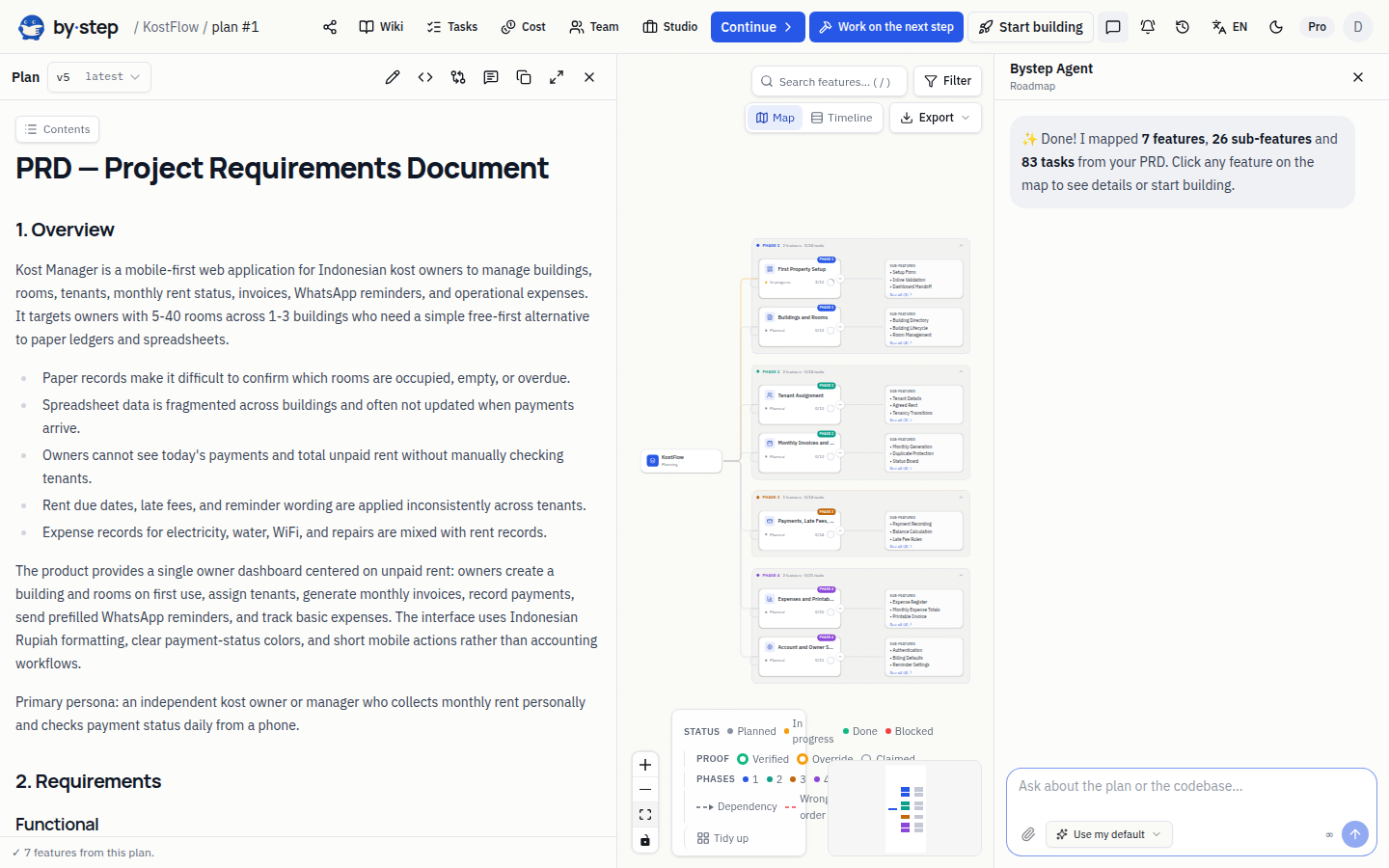
Break your plan into features, tasks, and a sequence your team can review.
Start freeUse a board or list. Assign owners, leave comments, and check completion evidence.
Start free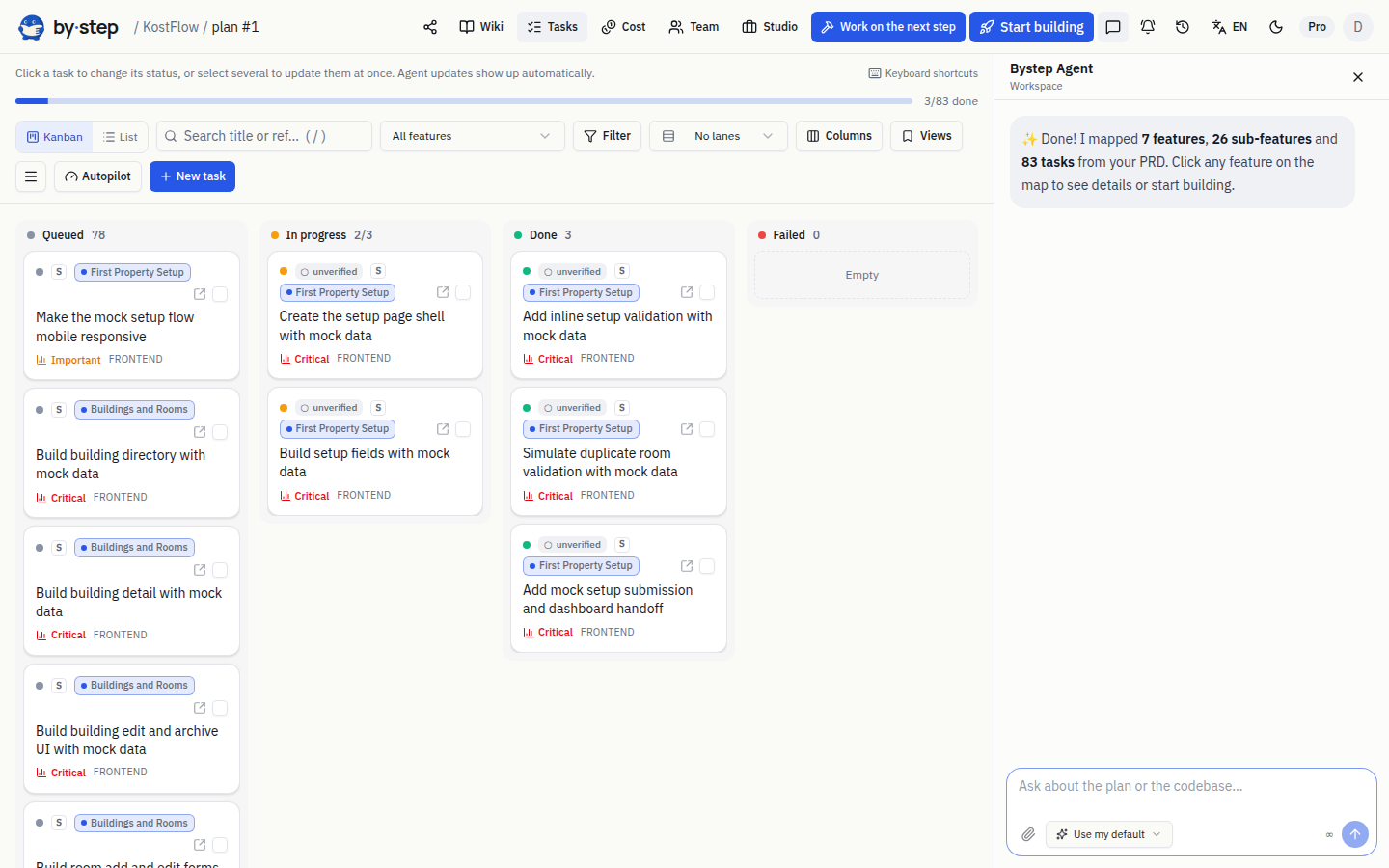
Keep project summaries and synced context so your team and agent share a reference.
Start free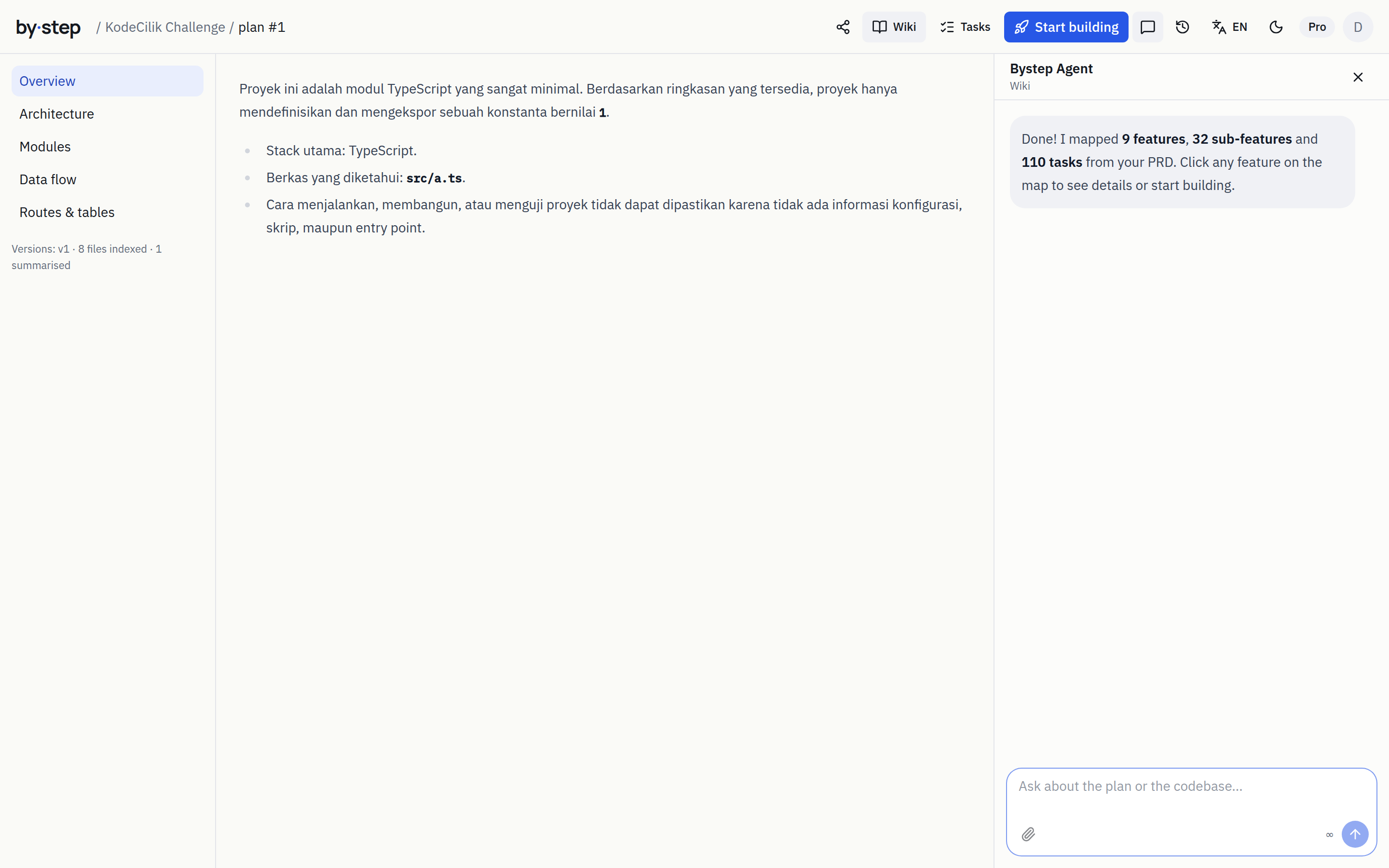
YOUR WAY TO BUILD
Choose what fits your experience. Your plan, progress, and check results stay together in Bystep.
Bystep builds step by step. Preview your app and review the results in your browser.
For projects supported by automatic mode. Usage depends on your allowance and AI connection.Explore automatic buildingNeed a second opinion? Get a review, polishing, or a working session to move forward.
A separate service from your subscription. Choose the support and review its cost before booking.Explore guided supportConnect your computer through Desktop or CLI and work through the plan with your chosen agent. Bystep prepares the tasks, context, and checks.
Use the official agent login or your own API key. CLI and MCP integrations remain available for your development tools.Connect your computerTeam Build · for teams of 2–10
Build with your cofounder and developers. Give each task a human owner, let everyone use their own coding tool, and follow the evidence, blockers and reviews in Bystep.
Review source requirements and coverage before creating tasks.
Agree on the audience and first outcome; keep open questions visible.
Sync its manifest and review proposed changes alongside existing work.
A claim reserves the task for one developer. Renew it while working or hand it off with context.
Fetch current context through the CLI or MCP, then use the coding tool you already know.
An independent reviewer checks the current criteria and revision. Changed scope needs fresh review.
See milestones, blockers, review queues and updates that need your attention.
Milestone: first shared release
Owner: frontend developer
Personal AI · active claim
Owner: backend developer
Test evidence submitted · teammate reviewing
Owner: founder
Product decision needed before the next task
Passing tests, human acceptance and a recorded release are separate states. Recording a release does not deploy the project.
Each developer signs in to their AI locally. A workspace invitation does not share AI credentials, billing access or another person's computer.
Choose a payer and reserve an amount per session. Unreported costs stay unknown; reservations remain until reconciled. Provider usage outside Bystep follows that account's limits.
Link GitHub PRs and required checks. Import and refresh GitLab.com issues with read-only access, reviewing conflicts before applying changes.
Team Build coordinates people using their own tools. Agent teams provide a separate workflow for orchestrating AI workers. Explore agent teams
AGENT TEAMS · CLOUD & YOUR COMPUTER
Choose where coding runs and which AI it uses on the Build page. Bystep assigns work from the same plan and checks the combined results.
Run coding in the cloud with your Bystep plan. Start and monitor work directly from your browser.
Step and infrastructure allowances follow your plan.Add your AI connection for coding in the cloud or on your computer. Your selected provider bills AI usage.
The payer does not switch automatically when a provider fails. Infrastructure allowances still apply.Connect your computer and sign in through official Claude Code or Codex. Coding runs on your computer with that agent account.
Requires an installed agent and an account with access. Keep your computer awake.Planning, chat, and review use a separately selected AI source: Bystep AI or your API connection. A coding agent subscription does not automatically provide API access for those stages. See the AI provider policy
AGENT ORCHESTRATION
Select “Start agent team” when your plan is ready. Independent tasks can run together; dependent work follows its required order.
Choose parallelism, token/cost thresholds, and a deadline. Work already running may exceed the usage thresholds.
Your messages join subsequent assignments alongside each task’s context and acceptance criteria.
Approve checkpoints to continue. When stopped, Bystep waits for confirmation that processes have ended before releasing the work.
01 · Assign tasks to separate working folders
Results are checked together against the plan’s criteria. A process stopping does not make a task complete.
Review the evidence, request fixes if needed, and continue according to your approval checkpoints.
YOU STAY IN CONTROL
Every control below is optional and switched on per project. Without them, the agent team runs as usual.
A second agent reads the merged result without changing a single file, then records findings by severity. Serious findings hold the merge until they are fixed. Review allowance follows your plan.
On your computer, agents can be told to ask before risky commands or before every command. If nobody answers in time, the command is declined.
When there is a choice of direction, such as a merge conflict or a Reviewer finding, you see the options and what each one leads to. Your choice is recorded and used by agents on the next task.
One agent list for every path: Claude Code, Codex, Cursor, Gemini CLI, opencode, or your own project script on your computer, each according to its capabilities. The plan and the evidence stay the same, whoever does the work.
Bystep only uses paths the AI providers allow. Your subscription login stays in the official agent on your computer, not on our servers.
See the status of each providerHOW IT WORKS
Start with your needs, agree on the steps, then build and review the results with Bystep.
STEP 1
STEP 2
STEP 3
STEP 4
BYSTEP DESKTOP · OPTIONAL
Connect your account, sign in to an agent, and monitor the local connection in one window. Manage plans, reviews, and approvals in your browser.
.tgz archive. The latest version is in the download list. Requires Node.js 22+ and separately installed Claude Code or Codex.
The currently available and tested package is Linux x64. Windows and macOS Desktop packages are not yet available as supported releases. Cloud execution remains available through your browser.
Package versions and checksumsOpen bystep-desktop from the extracted download folder. Select “Connect account”, then confirm in your browser.
Under “Your agents”, select Sign in. Follow the provider’s official process with your own account.
Select “Start connection”. Choose this computer on the Bystep web Build page, then start your work.
Keep Desktop open and your computer awake during local work. You can also connect through the CLI without Desktop.
Design Room
A structured discovery room for teams, agency clients or capstone advisors — six async steps that turn a group chat into a PRD with a traceable origin for every feature.
A WhatsApp link is enough — a name, no sign-up. Only the room owner spends quota; everyone else writes cards and votes for free.
Idea cards stay locked until everyone reveals together. The facilitator summarizes, challenges and critiques from a persona — it never writes a card before people do.
Each feature in the resulting PRD links back to the card, the hypothesis and the vote that produced it — Proof-of-Why, not just Proof-of-Done.
Product workflow illustration
Simulation · a salon booking room
PROOF OF DONE
Product workflow illustration
F1-T3 · Onboarding form validates +62 numbers
verifiedYour agent understands project context, proposes changes for review, and works through tasks with check evidence. You choose the approval points.
Ask what is left in phase 2, which tasks touch auth, or why a feature exists. It reads the plan, not a chat log.
Every edit arrives as a proposal with a diff — including drift proposals when the code no longer matches the PRD. Apply, reject, or ask for another version.
Run bystep sync and the wiki is rebuilt from your repo, so the agent plans against the code you actually have.
bystep task nextThe agent gets a Task Packet of ~1–2k tokens: the PRD excerpt, pass criteria, files it may and may not touch, conventions from the wiki.
bystep task startThe starting commit is saved in .bystep/. Diff, duration and cost are measured from here.
agent worksIn the local workflow, your coding agent works on your project locally. Automatic mode uses Bystep’s server environment.
bystep task verifytest · build · lint · http · file · screenshot. Output is scrubbed of secrets, then uploaded as evidence.
bystep task completeNo passing evidence → refused (409). Two failures → the task tier escalates and a stronger model is suggested to the agent.
task approve · wave nextYou approve the phase, or return tasks to the agent with a note. Then up to 4 tasks with non-overlapping files run in parallel.
Three execution modes
CONTROL TOWER
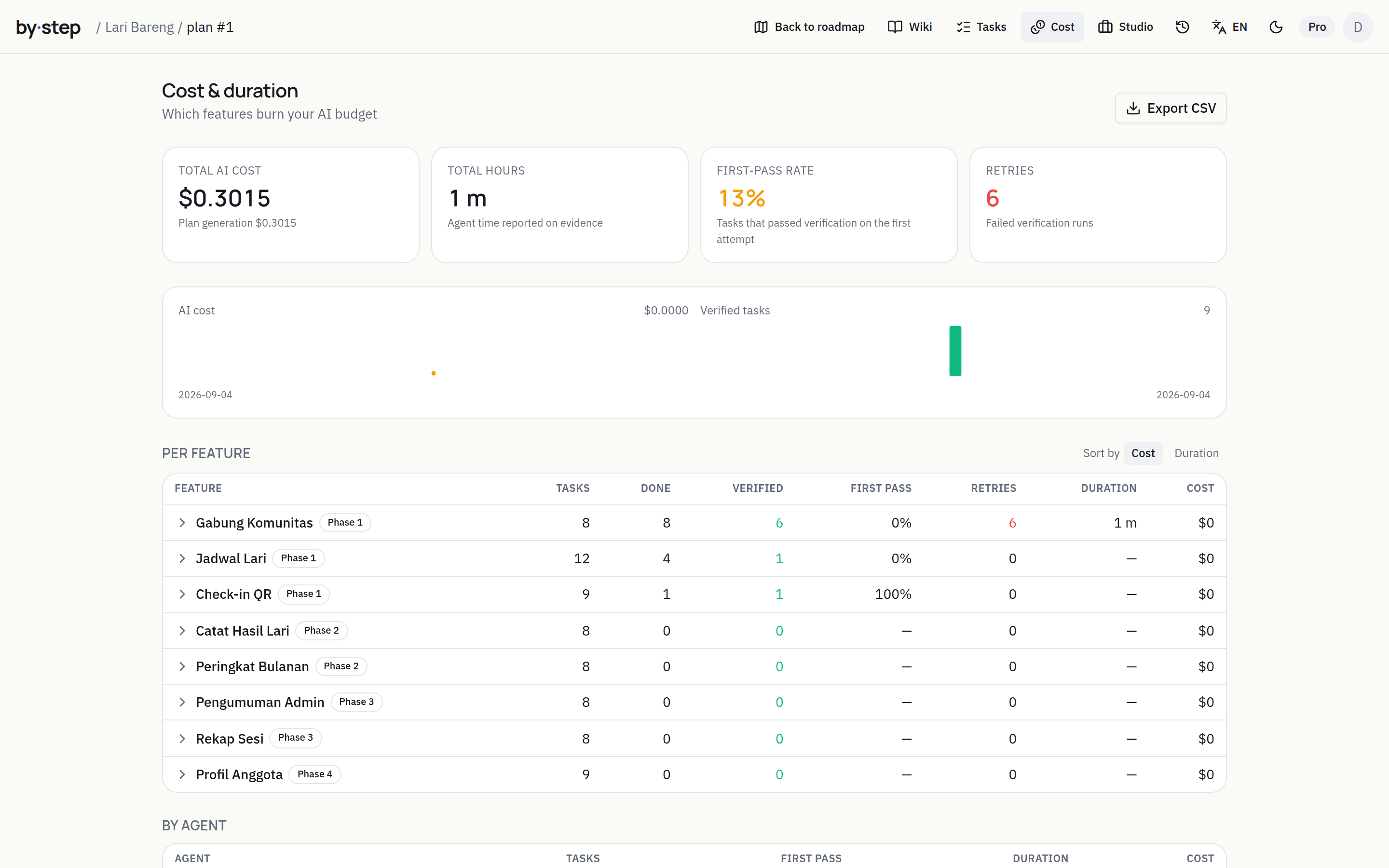
See agents, models, duration, attempts, and provider-reported tokens and costs. Bystep summarizes progress per feature, detects code drifting from the PRD, and assesses repository readiness for agents.
Review available usage by feature, task, and agent. Cost figures depend on the data each provider reports.
Spec coverage is computed every time the wiki is rebuilt; a cov badge appears on roadmap nodes. When code drifts, the agent proposes a PRD revision — you apply or reject.
Paste a public repo URL: 11 signals, 100 points, plus leaked secrets. Offline: bystep doctor --repo with the identical score.
Anonymous pass rate per agent, model and task kind across all Bystep verifications. One-click opt-out in Settings.
PLATFORM CAPABILITIES
From the first decision to ongoing maintenance. Open the guides to see how each capability works.
Share scope, assign owners, claim tasks, hand off context and review progress together.
Learn moreOne inbox for approvals, comments, and work needing help, with a clear next action.
Learn moreSet project rules. Repeated failures create a fix task with the evidence of what went wrong.
Learn moreOwners, comments, activity, and notifications with daily digests based on your settings.
Learn moreChoose a model within your plan or connect your own AI service. Provider usage is billed separately.
Learn moreStart with local business templates or continue from an existing project and documents.
Learn moreMove plans between tools, export documents, and connect agents through CLI, MCP, or API.
Learn moreDesign Rooms, capstone projects, participation, and rubrics support collaborative learning.
Learn moreExplore AI tools, comparisons, coaching, and support for your project needs.
Learn moreBYSTEP STUDIO
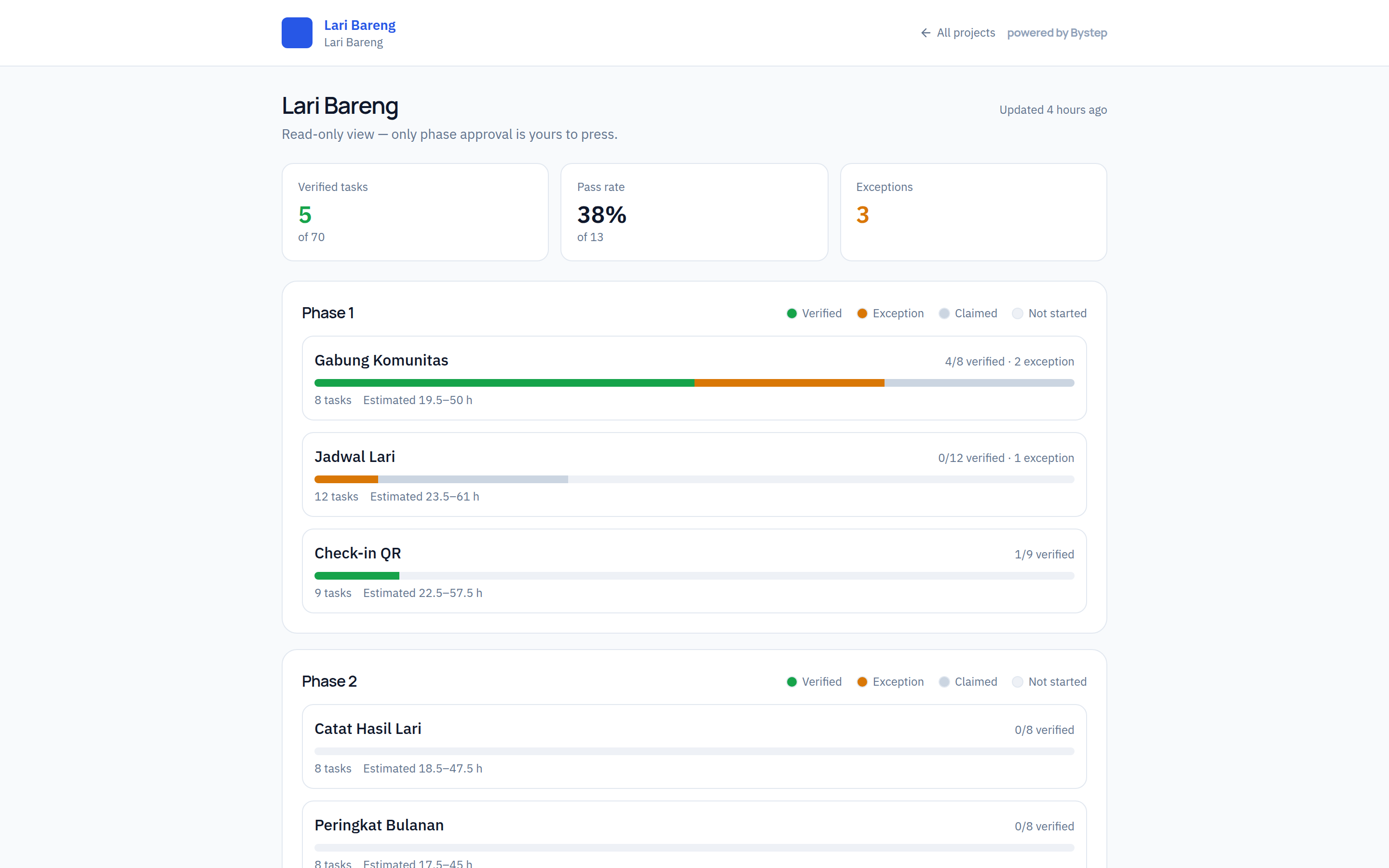
Your agent has already proven every task. Studio turns that evidence into what clients pay for: estimates, proposals, a progress page and a handover package.
Median verified durations across projects, times your rate and a buffer — not a guess.
Bilingual, versioned, with your agency’s logo and colours. Built from the same PRD and estimate.
Evidence bar per feature, exceptions, an Approve-phase button. Approvals are recorded in the client’s name.
PRD, wiki, evidence log, overrides, estimate vs actual, deploy and security notes — one file.
Estimates · proposals · client portal · handover
FROM PREVIEW TO APP
For automatic projects, previews, readiness checks, and release versions are part of one workflow.
Explore the full workflowPublishing depends on project readiness and hosting limits. Local projects use your own hosting provider.
Try your app in the browser and review the checklist before publishing.
Publish to an app address provided by Bystep. See its status and release history.
Restore a previous version, pause or wake your app, and download the project as a ZIP.
CLI & AGENT-NATIVE
Connect your computer and agent through CLI, skills, hooks, or MCP. Run a single task or coordinate an agent team from the same plan.
Product workflow illustration
Install the CLI from the computer guide. Connect projects, start or monitor a team, send guidance, stop, and resume workflows from your terminal.
bystep init prepares instructions and checks for supported agents, following your project rules.
Existing plan and task tools remain available. Six workflow controls add listing, details, start, stop, resume, and messages for your agent team.
CLI & MCP · command contracts available in the guides
YOUR CODE STAYS YOURS
In local mode, sync metadata and summaries you review. In automatic mode, code is built on Bystep servers for previews and publishing. AI processing follows the connection you choose.
In the CLI workflow, sync uploads the manifest and agent summaries. Review the contents before sending.
How sync worksbs_ tokens live in ~/.config/bystep with mode 0600. Revoke any of them from Settings in one click.
Manage tokensconfig.json holds ids only and is safe to commit; pending, summaries and state are git-ignored automatically.
Read the docsSkipping evidence needs a written reason; it shows on the task card, the public page and the audit export. No silent “done”.
Read about Proof-of-DonePRICING
Prices and allowances below come from Bystep’s active plan catalog. Choose your currency and review the details before subscribing.
Loading current plans…
See all billing periods, currencies, models, and allowances on the pricing page. Guided support and your own AI provider usage are charged separately.
See all plansBystep does not replace your spec — it becomes its evidence gate. Plans come in and go out as your tool’s native files.
FAQ
Answers to help you choose how to work.
Yes. Each developer uses their own local AI account and reports through the Bystep CLI or MCP. Claim a task, fetch current context, do the work, verify and submit for review. Claims coordinate ownership; they do not launch an AI or share subscriptions. Agent teams are a separate execution workflow.
You can start from a PRD, a short brief or a synced codebase. Review proposed requirements, source coverage and conflicts before applying the scope. An observed codebase is not automatically treated as verified work.
No. Evidence, human acceptance and release are tracked separately. The owner can record a deployment that has already completed. The record stores its revision and destination; it does not run deployment. Tasks with only manual criteria can receive independent human review without being labeled test-verified.
GitLab.com supports read-only import and refresh with a read_api token. Preview changes and resolve conflicts before applying them. Closing a GitLab issue does not accept or release a Bystep task. Linear and Jira integrations are not available in this release.
You can start without coding. Describe your needs on the getting-started page, review the plan, and choose Automatic or Guided. Local mode is for people using their own coding agent and development tools.
Free includes an initial allowance for planning and agent chat. See the pricing section for current limits. Automatic building, your own AI service, guided support, and hosting follow their own terms; free to start does not mean every part of the process is free.
In the local CLI workflow, sync sends metadata and agent-prepared summaries. In Automatic mode, project code is built and stored in Bystep’s server environment for preview and publishing. Context sent to AI providers depends on your chosen workflow and connection.
Yes. Use the existing-project flow, connect a workspace through the CLI, or import a supported plan format. Automatic mode has its own stack requirements; not every codebase can run automatically.
Tasks have acceptance criteria and check evidence. Your execution mode controls when approval is required. Overriding a check requires a recorded reason. Evidence helps you review results; test the app for your needs before release.
Choose Bystep AI, a supported provider API key, or the official Claude Code/Codex login for coding on your computer. Select planning and review AI separately. CLI/MCP integrations remain available for other agents according to their capabilities. Provider charges and infrastructure allowances follow your choices.
Yes. Workspaces support members, owners, comments, and activity. Studio adds estimates, proposals, a client portal, and handover. Campus supports capstones and facilitation. Access and limits depend on your plan.
For supported automatic projects, you can see release status, restore a previous version, pause or wake the app, and export a ZIP. Review hosting limits and your project checklist before using it for production.
Yes, through the official agent login on your computer, provided your account includes access. Connect through Desktop or CLI, then select the agent and its login on the Build page. Planning, chat, and review use Bystep AI or an API connection selected separately.
Desktop is optional. Run coding in the cloud from your browser or connect a supported computer through the CLI. The current Desktop package is for Linux x64 and requires Node.js 22+ and a separately installed official agent. Windows and macOS Desktop packages are not yet available as supported releases.
Bystep assigns tasks by dependencies and file scope. Independent tasks use separate working folders; dependent or conflicting work runs in sequence. Results are then combined and checked before completion. You can send guidance, stop the team, and approve checkpoints to continue.
Usage figures depend on provider reports. Token and cost thresholds stop subsequent assignments; requests already running may exceed them. Some agent subscriptions do not report monetary costs, so that information is shown as unknown. You can also set team size and a deadline.